

If a job posting quotes $60,000 a year and another quotes $28 an hour, you can’t tell which one pays more until you convert them into the same unit. That’s the exact job of a Salary to Hourly Calculator — it takes your annual salary and breaks it down into an hourly, weekly, and monthly rate so you can compare job offers, price freelance work, or simply understand what your time is actually worth.
This guide covers the formula behind the conversion, the assumptions that change the result, and how to use a free calculator to get an accurate number in seconds.
Why Convert Salary to an Hourly Rate
Annual salary is a convenient number for budgeting, but it hides a lot of useful detail. Converting it into an hourly rate matters for:
- Freelancers and contractors who need to quote an hourly rate that matches a target annual income
- Job seekers comparing a salaried offer against an hourly one
- Part-time or reduced-hour employees who want to know their real hourly equivalent
- Anyone evaluating overtime, side gigs, or extra shifts, where pay is calculated hourly
- Employees weighing a raise presented as a salary bump instead of an hourly increase
Without converting, it’s easy to accept an offer that looks bigger on paper but actually pays less per hour once the full picture is considered.
The Formula Behind Salary to Hourly Conversion
The core formula is straightforward:
Hourly Rate = Annual Salary ÷ (Hours per Week × Weeks per Year)
For a standard full-time schedule of 40 hours a week, 52 weeks a year, that’s 2,080 total working hours. So:
- $52,000 ÷ (40 × 52) = $52,000 ÷ 2,080 = $25.00 per hour
From the hourly figure, you can also work out:
- Weekly pay = Annual Salary ÷ Weeks per Year
- Monthly pay = Annual Salary ÷ 12
- Daily rate = Hourly Rate × Hours per Day
The two inputs that change this calculation the most are hours per week and weeks per year — which is exactly why a flexible calculator beats a fixed 2,080-hour assumption.
Read also
Why the Weeks-per-Year Number Isn’t Always 52
Most tools default to 52 weeks because that assumes you’re paid for the entire year, including paid vacation and holidays. But if you take unpaid leave, work part of the year, or have a seasonal schedule, using 52 weeks will understate your real hourly rate.
For example, someone earning $50,000 a year who takes two unpaid weeks off actually works 50 paid weeks, not 52. Recalculating with 50 weeks instead of 52 raises the effective hourly rate slightly, because the same salary is now spread across fewer working weeks. This is a small adjustment, but it matters most for freelancers and contractors pricing their time accurately.
How to Use a Salary to Hourly Calculator
Getting an accurate hourly rate takes less than a minute with the Salary to Hourly Calculator:
- Enter your annual salary before taxes. Always use the gross figure, not an estimated take-home amount.
- Set your hours per week. Use 40 for standard full-time work, or your actual average for part-time schedules.
- Set your weeks per year. Use 52 for a full paid year, or lower it if you take unpaid time off.
- Click calculate to see your hourly, weekly, and monthly breakdown instantly.
The tool runs entirely in your browser, so there’s no sign-up and nothing is stored — you can rerun the numbers as many times as needed to model a new offer, a schedule change, or a proposed raise.
Common Mistakes When Converting Salary to Hourly
Using a fixed 2,080-hour year for everyone. This number only holds if you work every week of the year with no unpaid time off. Part-time employees, seasonal workers, and anyone with unpaid leave need to adjust the hours or weeks manually to get an accurate rate.
Mixing up gross and net pay. A salary-to-hourly conversion always produces a gross hourly rate — before taxes and deductions. It’s not what actually lands in your bank account per hour worked. For that, you’d need to factor in tax withholding separately.
Forgetting overtime obligations. If you’re converting a salary to compare it against hourly, non-exempt work, remember that hourly employees may be entitled to overtime pay — commonly time-and-a-half after 40 hours per week under the U.S. Department of Labor’s overtime rules. A flat conversion doesn’t account for that premium.
Ignoring part-time schedules. The formula works for any number of hours — not just 40. Part-time workers should enter their actual average hours per week rather than assuming the calculator only applies to full-time schedules.
Salary to Hourly vs. Hourly to Salary
Sometimes you need the conversion to run the other way — starting from an hourly wage and figuring out the equivalent annual salary. That’s useful when comparing an hourly job offer against a salaried one. In that case, the Hourly to Salary Calculator uses the same variables in reverse:
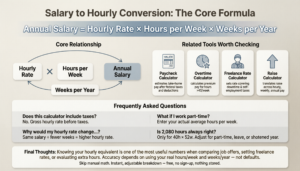
Annual Salary = Hourly Rate × Hours per Week × Weeks per Year
Both calculators use the same core relationship — just solving for a different variable depending on which number you already have.
Related Tools Worth Checking
Once you know your hourly rate, a few related calculators can complete the picture:
- Paycheck Calculator — estimates your actual take-home pay after federal taxes and deductions.
- Overtime Calculator — calculates pay for hours worked above the standard 40-hour week at the correct premium rate.
- Freelance Rate Calculator — helps contractors set an hourly rate that accounts for unpaid downtime and self-employment taxes.
- Raise Calculator — shows how a proposed raise translates across hourly, weekly, and annual pay.
Frequently Asked Questions
Does this calculator include taxes? No. The result is your gross hourly rate before taxes and deductions. Use the Paycheck Calculator to estimate net, after-tax pay.
What if I work part-time? Enter your actual average hours per week instead of 40, and the calculator will scale your hourly rate accordingly.
Why would my hourly rate change if I adjust the weeks per year? Because the same annual salary is divided across fewer or more working weeks. Fewer paid weeks means a higher effective hourly rate for the same salary, and vice versa.
Is 2,080 hours always the right number to use? Only for a standard 40-hour, 52-week schedule. Adjust the hours or weeks if your schedule differs — part-time work, unpaid leave, or a shortened work year all change the total.
Final Thoughts
Knowing your hourly equivalent is one of the most useful numbers you can have when comparing job offers, setting freelance rates, or evaluating whether extra hours are worth your time. The formula is simple, but the accuracy depends entirely on using your real hours per week and weeks worked per year, not a generic default.
Skip the manual math and get an instant, adjustable breakdown with the Salary to Hourly Calculator — free, with no sign-up, and nothing stored on any server.