
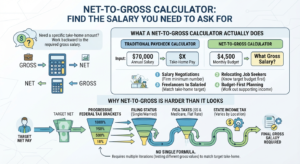
Most salary calculators work in one direction: you enter a gross number and get your take-home pay. But what if you already know how much you need to take home each month — for rent, savings, or a budget — and want to work backward to the gross salary that gets you there? That is exactly what a net-to-gross calculator solves, and it is one of the most useful tools for anyone heading into a salary negotiation.
This guide explains how net-to-gross conversion works, why it is harder than a simple hourly-to-salary calculation, and how to use the results to negotiate with confidence.
Table of Contents
What a Net-to-Gross Calculator Actually Does
A regular paycheck calculator answers: “If I earn $70,000 a year, how much do I actually take home?” A net-to-gross calculator flips the question: “I need $4,500 a month in my bank account — what gross salary gets me there?”
This reverse calculation is especially useful for:
- Salary negotiations, where you want a firm minimum number to ask for
- Job seekers relocating, who know their target monthly budget before they know the offer
- Freelancers transitioning to salaried work, who need to match a specific take-home target
- Anyone budgeting first, then working out what income supports that budget
Why Net-to-Gross Is Harder Than It Looks
Converting hourly pay to an annual salary is one multiplication. Going from net to gross is not, because the U.S. tax system is progressive — you do not pay one flat rate on your entire income.
Each dollar you earn falls into a tax bracket, and the rate increases as your income rises, according to the IRS federal income tax brackets. That means there is no single formula like “gross = net ÷ 0.75.” Instead, the calculation has to work through the tax brackets step by step, testing gross income values until the resulting take-home pay matches your target.
On top of federal brackets, the calculation also has to account for:
- Filing status (single, married filing jointly, etc.) — this shifts where each bracket starts and ends
- FICA taxes (Social Security and Medicare), which apply at a flat rate regardless of bracket, as outlined by the Social Security Administration
- State income tax, which varies significantly depending on where you live and work
This is why a net-to-gross calculator needs to run several iterations behind the scenes rather than solving the problem in one step.
How to Use the Net-to-Gross Calculator
- Enter your desired annual take-home pay. This is the number that actually needs to land in your bank account after taxes.
- Select your filing status. Single and married filing jointly use different bracket thresholds, so this changes the result meaningfully.
- Enter your estimated state tax rate. If you are not sure of your exact rate, a rough estimate still gets you close — state tax rules vary widely, so treat this as an approximation.
- Click “Find required salary.” The calculator returns your required gross annual salary, along with the estimated total tax, gross monthly pay, and a breakdown you can use directly in a negotiation.
Because the calculation is an estimate based on simplified federal brackets, treat the result as a strong starting point for a conversation, not a guaranteed final number.
Net-to-Gross in a Real Negotiation
Say you know you need $60,000 a year to comfortably cover your budget after taxes. Instead of guessing at a round number like “$75,000” when an employer asks for your salary expectations, the net-to-gross calculation gives you a defensible, specific figure based on your actual take-home need — for example, “$78,400” instead of a number pulled from thin air.
That specificity matters. Recruiters and hiring managers tend to take a precise, reasoned number more seriously than a rounded guess, and it gives you a clear floor below which an offer genuinely does not work for your budget.
Common Mistakes to Avoid
- Forgetting state taxes entirely. Two people with identical federal situations can need very different gross salaries depending on their state’s income tax rate. Always include an estimated state rate, even a rough one.
- Ignoring pre-tax deductions. Contributions to a 401(k), HSA, or pre-tax health insurance premiums reduce your taxable income before brackets are applied, which changes the required gross salary. If your target job offers strong pre-tax benefits, your real required salary may be slightly lower than the calculator’s baseline estimate.
- Treating the result as exact. The calculator uses simplified federal income tax brackets and standard FICA rules. Actual liability depends on deductions, credits, and your specific state’s tax code, so use the output as a strong estimate rather than a filed-return-accurate figure.
- Skipping the reverse-check. Once you have a gross figure, run it back through a standard Paycheck Calculator to confirm the take-home number lines up with what you originally wanted.
Frequently Asked Questions
Is a net-to-gross calculator the same as a paycheck calculator? No — a paycheck calculator goes forward (gross to net), while a net-to-gross calculator solves the reverse problem, working out the gross salary needed to hit a specific take-home target.
Why can’t I just divide my target by 0.75? Because tax brackets are progressive, not flat. A single division ratio only works for a flat-tax system. In the real U.S. system, different portions of your income are taxed at different rates, so the calculator has to solve iteratively.
Does this account for bonuses or commission? No, the calculator assumes a standard annual salary. If a meaningful part of your compensation comes from bonuses, check a dedicated Bonus Tax Calculator separately, since bonus income is often withheld at a different rate.
Can I use this if I’m paid hourly instead of salaried? Yes — first find your target annual take-home, use the net-to-gross calculator to find your required gross salary, then convert that gross salary into an hourly rate using the Hourly to Salary Calculator in reverse.
What if I don’t know my exact state tax rate? Use a reasonable estimate for your state — even an approximate rate gets you close enough for negotiation purposes. For an exact figure, the IRS Tax Withholding Estimator can help refine your federal estimate alongside your state’s own tax tables.
Related Calculations Worth Checking
- Paycheck Calculator — run your new gross salary forward to confirm the take-home number matches your goal.
- Tax Bracket Calculator — see exactly which bracket your required gross salary falls into.
- Hourly to Salary Calculator — convert your required gross salary into an equivalent hourly rate.
- Bonus Tax Calculator — check how a signing bonus or annual bonus affects your total take-home separately from base salary.
Final Thoughts
A net-to-gross calculator turns a budgeting goal into a concrete negotiation number — instead of guessing at a salary figure, you can walk into a conversation with an exact gross amount backed by real tax math. Use the calculator above to find your number, then confirm it with the Paycheck Calculator before you put a figure on the table.