
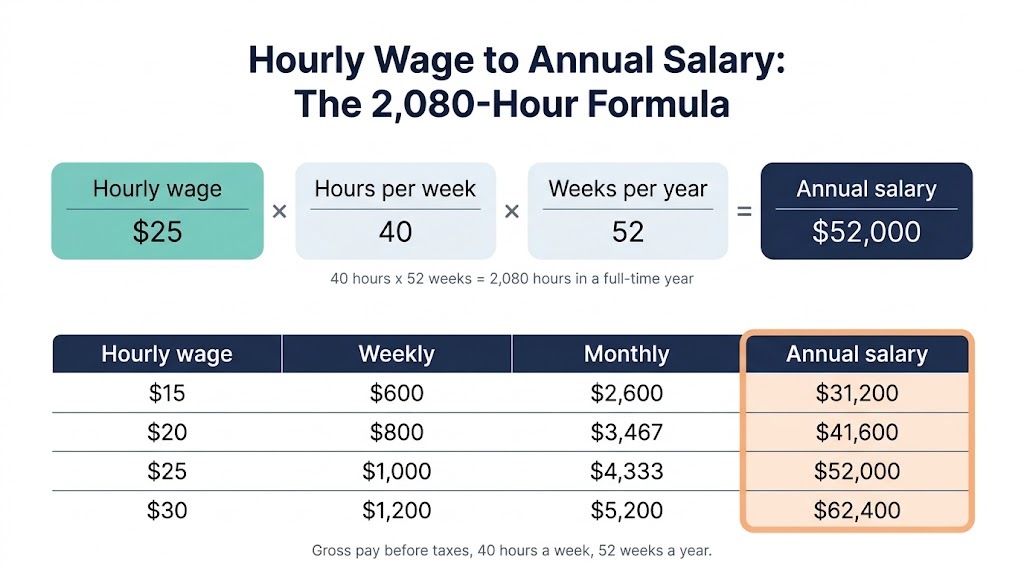
Converting an hourly wage to an annual salary takes one multiplication: multiply your hourly rate by 2,080, the hours in a standard full-time year (40 hours a week for 52 weeks). At $25 an hour that is $52,000 a year, and $15 an hour is $31,200. Whether you are comparing a job offer, negotiating a raise or planning a household budget, knowing your yearly earnings is one of the most useful numbers you can have.
Need your exact figure? Use our free Hourly to Salary Calculator for yearly, monthly, biweekly and weekly pay in seconds. Or keep reading for the formula, a chart from $10 to $100 an hour, and the factors that change what actually reaches your bank account.
Last reviewed: October 11, 2026. All figures are gross, before taxes.
The Hourly to Annual Salary Formula
The standard formula assumes a full-time schedule:
Annual salary = Hourly wage × Hours per week × Weeks per year
For a typical full-time employee that is hourly wage × 40 × 52, or hourly wage × 2,080. If you expect two weeks of unpaid vacation, use 50 weeks instead: hourly wage × 40 × 50.
Hourly to Annual Salary Chart for 2026
This chart converts common hourly wages using 40 hours a week and 52 weeks a year (2,080 hours). The monthly column is the annual salary divided by 12, because a month averages about 4.33 weeks, not exactly four.
| Hourly wage | Weekly | Biweekly | Monthly | Annual salary |
|---|---|---|---|---|
| $10.00 | $400 | $800 | $1,733 | $20,800 |
| $12.00 | $480 | $960 | $2,080 | $24,960 |
| $14.00 | $560 | $1,120 | $2,427 | $29,120 |
| $15.00 | $600 | $1,200 | $2,600 | $31,200 |
| $16.00 | $640 | $1,280 | $2,773 | $33,280 |
| $17.00 | $680 | $1,360 | $2,947 | $35,360 |
| $18.00 | $720 | $1,440 | $3,120 | $37,440 |
| $19.00 | $760 | $1,520 | $3,293 | $39,520 |
| $20.00 | $800 | $1,600 | $3,467 | $41,600 |
| $22.00 | $880 | $1,760 | $3,813 | $45,760 |
| $25.00 | $1,000 | $2,000 | $4,333 | $52,000 |
| $28.00 | $1,120 | $2,240 | $4,853 | $58,240 |
| $30.00 | $1,200 | $2,400 | $5,200 | $62,400 |
| $35.00 | $1,400 | $2,800 | $6,067 | $72,800 |
| $40.00 | $1,600 | $3,200 | $6,933 | $83,200 |
| $45.00 | $1,800 | $3,600 | $7,800 | $93,600 |
| $50.00 | $2,000 | $4,000 | $8,667 | $104,000 |
| $60.00 | $2,400 | $4,800 | $10,400 | $124,800 |
| $75.00 | $3,000 | $6,000 | $13,000 | $156,000 |
| $100.00 | $4,000 | $8,000 | $17,333 | $208,000 |
Going the other way? Use the salary to hourly calculator, or read our salary to hourly chart.
Step by Step: Convert Your Hourly Wage to Annual Salary
- Find your hourly rate: your base wage before taxes or deductions.
- Find your weekly hours: most full-time roles use 40; part-time and shift work varies.
- Multiply by weeks worked per year: use 52 for a standard year, or subtract unpaid weeks off.
- Add predictable overtime or bonuses separately, since they are not part of your base rate.
- Subtract estimated taxes if you want a take-home figure. Our paycheck calculator does this automatically.
The same formula works for part-time schedules. At $18 an hour for 25 hours a week over 52 weeks, the annual pay is $18 × 25 × 52 = $23,400. At 30 hours a week it is $28,080.
A raise of one dollar an hour adds $2,080 a year at full-time hours, and a $2 raise adds $4,160. See the raise calculator for percentage and hourly raise charts.
Factors That Change Your Real Take-Home Pay
- Income taxes: federal, state and local taxes vary by state. Texas, Florida and Washington, for example, have no state income tax on wages.
- Payroll taxes (FICA): Social Security and Medicare take 7.65% from most employees.
- Health insurance and retirement: pre-tax deductions for a 401(k) or employer health plan lower taxable income and take-home pay.
- Unpaid time off: unpaid leave pulls your yearly total below the 2,080-hour estimate.
- Overtime and shift differentials: regular overtime can lift your income well above the base estimate.
- Bonuses and tips: variable income is not part of the base rate but belongs in your true annual total.
2026 Minimum Wage Snapshot
The federal minimum wage has been $7.25 an hour since 2009, and it still applies by default in about 20 states. At the state level the picture is very different. According to the U.S. Department of Labor, 17 states plus Washington, D.C. now have a minimum wage of at least $15 an hour at the standard rate, including Arizona ($15.15), Colorado ($15.16), Maine ($15.10), Missouri ($15.00) and Nebraska ($15.00). New York pays $17 an hour in New York City, Nassau, Suffolk and Westchester counties and $16 elsewhere in the state. Florida’s minimum wage reached $15 an hour on September 30, 2026.
Many cities and counties set their own higher minimum wages, so check your local rate on the Department of Labor’s state minimum wage page. It directly affects the low end of any hourly to annual calculation.
Overtime Pay and the FLSA
The Fair Labor Standards Act requires covered non-exempt employees to receive at least 1.5 times their regular rate for hours over 40 in a workweek. Overtime is counted by the week, not averaged across pay periods, and a few states such as California add daily overtime. Salaried exempt employees are generally not entitled to overtime. Because the 2,080-hour formula assumes no overtime, add regular overtime separately. Use our overtime calculator to total regular and overtime pay, and see the Department of Labor overtime page for the federal rules.
Why This Matters When Job Hunting
- Comparing offers across formats: a $28 an hour offer and a $58,000 salaried role are not comparable until you convert one. $28 × 2,080 = $58,240.
- Negotiating from an informed position: knowing your annual equivalent, including expected overtime, strengthens a raise or offer discussion.
- Weighing benefits, not just pay: a slightly lower rate with employer-paid insurance or a 401(k) match can beat a higher rate with no benefits once annualized.
- Budgeting for job changes: moving between salaried and hourly work is easier to plan once both are in the same unit.
Frequently Asked Questions
How do I convert hourly wage to annual salary?
Multiply your hourly wage by hours per week, then by weeks per year. For a standard full-time schedule that is hourly wage × 2,080. For example, $22 an hour × 2,080 = $45,760 a year before taxes.
How much is $15 an hour per year?
$31,200 a year at 40 hours a week for 52 weeks, or about $2,600 a month before taxes.
Does the 2,080-hour formula account for holidays or paid time off?
It assumes you are paid for 40 hours every week of the year, so paid holidays and paid time off are included. If your time off is unpaid, subtract those weeks from the 52 before multiplying.
How do I convert a salary back to an hourly rate?
Divide the annual salary by 2,080, or use our Salary to Hourly Calculator.
Is this a gross or net figure?
Gross, before taxes and deductions. Use the Paycheck Calculator for estimated take-home pay.
Do part-time hours use the same formula?
Yes. Replace 40 with your average weekly hours.
Sources
- U.S. Department of Labor: State minimum wage laws
- U.S. Department of Labor: Fair Labor Standards Act
- U.S. Department of Labor: Overtime pay